
Artist Social Media Linking Platform Free: 3 Tools for Centralized Art
You have just finished an incredible set. The energy in the room is electric, the applause is fading into a buzz of conversation, and you can feel that adrenaline pumping through your veins. Someone from the audience walks up to you, eyes wide with excitement, and asks that golden question everyone wants to hear.
Where can I find your music?
Or perhaps they ask where they can see your paintings, watch your magic tricks, or follow your dance crew. In that split second, you freeze. Do you send them to Instagram?
But your full portfolio is on a website you haven't updated in months. Your new tracks are on SoundCloud, but your best videos are on TikTok.
You start rattling off a list of handles and URLs, watching their eyes glaze over as the moment passes. This is the nightmare scenario for any creative professional.
It is exactly why you need an artist social media linking platform free of charge to streamline your chaotic digital footprint into one clean, professional signal. We are living in an era where attention spans are shorter than ever. If you make a fan work to find you, you have already lost them.
Centralizing your art is not just a convenience; it is a necessity for survival in the creator economy.
You might be thinking that setting up a central hub requires technical skills or a monthly budget you simply do not have. That is a misconception that holds too many talented people back.
The reality is that an artist social media linking platform free plan is often all you need to get started. These tools act as your digital business card, a one-stop-shop where your audience can connect with every facet of your work without jumping through hoops.
We are going to look at three essential tools that solve this problem.
We will dig deep into their features, their pros and cons, and exactly how you can use them to turn a casual observer into a loyal member of your community. Whether you are a painter, a street performer, or a garage band rocker, centralization is the key to growth.
The Problem: Digital Fragmentation Kills Engagement
Before we jump into the tools, we need to understand the problem we are solving. It is called digital fragmentation.
You have a presence everywhere. You are posting stories on Instagram, uploading shorts to YouTube, tweeting updates, and maybe even maintaining a Patreon.
Each of these platforms is an island. They do not naturally talk to each other, and worse, they often throttle links that lead users off their specific app.
When a potential fan finds you on one island, they have no map to find the others. They might love your visual art on Instagram but have no idea you sell prints on Etsy. They might hear a song snippet on TikTok but never find the full track on Spotify because the link wasn't easy to click.
Every extra click you force a user to make cuts your conversion rate significantly.
It is a leak in your funnel.
This is where an artist social media linking platform free solution bridges the gap. It provides a single URL—a master key—that unlocks your entire universe. Instead of maintaining five different bios, you update one.
Instead of printing five different QR codes for a flyer, you print one.
There is also an aesthetic element to this. How you present yourself matters.
Just as you might look for advice on presentation or self-care from sources like Marlay Cosmetics to ensure you look your best physically, your digital "face" needs to be just as polished. A messy list of links looks unprofessional.
A sleek, branded landing page looks like you mean business.
Tool 1: Linktree – The Industry Giant
You have definitely seen this one. It is practically synonymous with the concept of a "link in bio." Linktree was one of the first to market, and because of that, it has become the default artist social media linking platform free choice for millions of users.
Its popularity isn't an accident; it is incredibly reliable and recognized by users instantly.
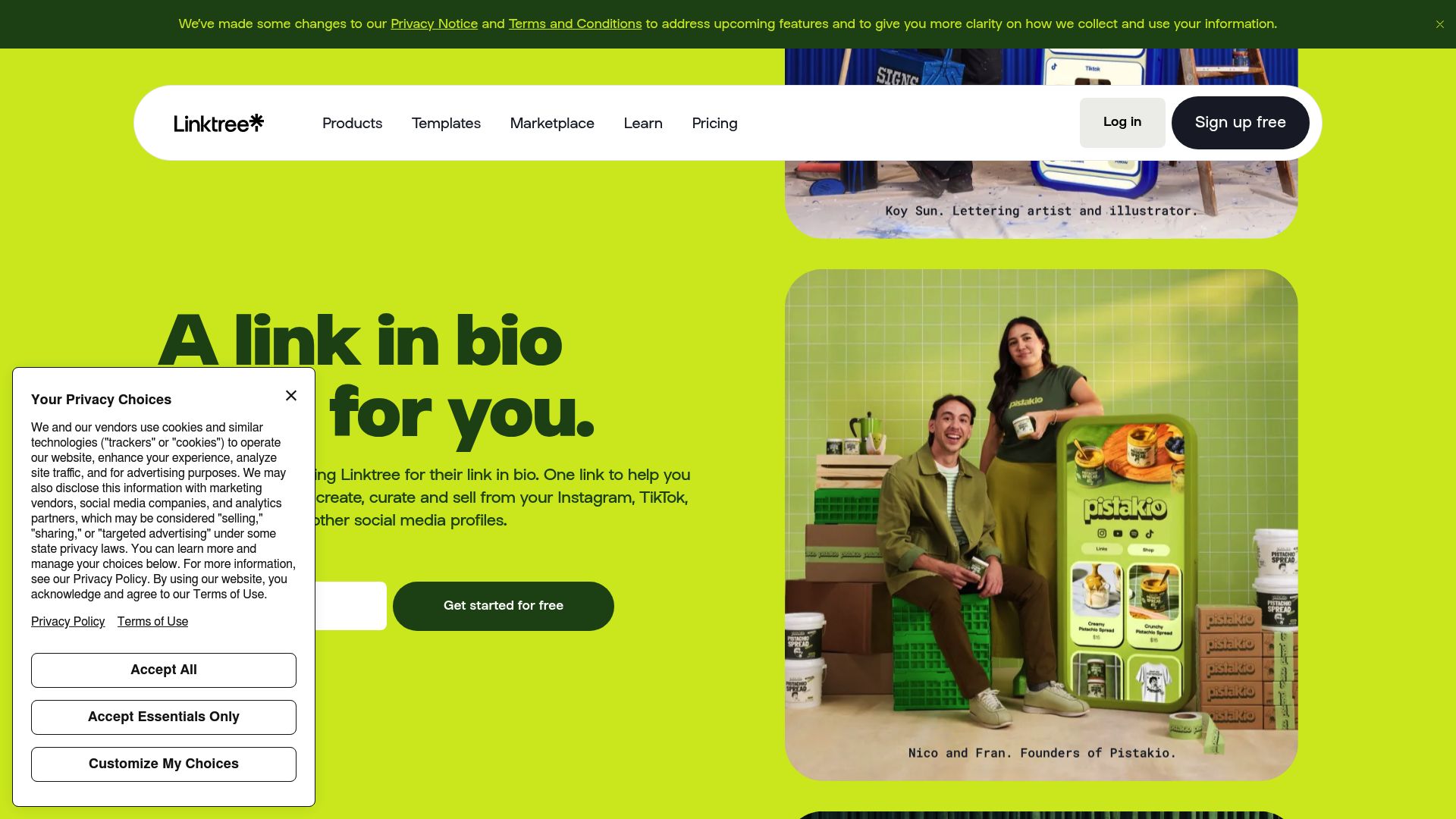
Source: https://linktree.com
What You Get for Free
Linktree's free plan is generous enough for most beginners. It allows you to create an unlimited number of links.
This means if you have twenty distinct portfolio pieces or press articles you want to showcase, you can list them all. While I generally advise against clutter, having the option is nice.
You also get access to basic analytics. You can see how many people visited your page and how many clicked on your links.
For an artist just starting to take their metrics serious, this is a great baseline. You need to know if that traffic from your latest Instagram reel actually went anywhere.
The Set-Up Process
Setting up Linktree is intuitive. You sign up, choose your handle (which becomes `linktr.ee/yourname`), and start dragging and dropping link blocks.
You can customize the background with some preset gradients or solid colors.
It is functional, clean, and safe.
The Drawbacks for Artists
However, Linktree has limitations when you stick to the free version. But here's the catch: you can't get rid of the Linktree logo, and your font choices are pretty basic.
For visual artists—like painters or graphic designers—that generic look can really clash with your brand identity.
It ends up looking more like a utility than a piece of art.
And on top of that, while it’s a great directory, it doesn't really have any special features built for physical performers.
Think about it: if you're a street artist or a busker, Linktree pretty much assumes your audience is already finding you online.
Tool 2: Beacons – The Content Creator's Swiss Army Knife
If Linktree is the reliable sedan, Beacons is the flashy sports car with a dashboard full of buttons.
You've probably seen Beacons around; it goes hard after the "creator" crowd—think YouTubers, TikTok influencers, and streamers. However, it functions exceptionally well as an artist social media linking platform free of charge, especially if you are digitally native.
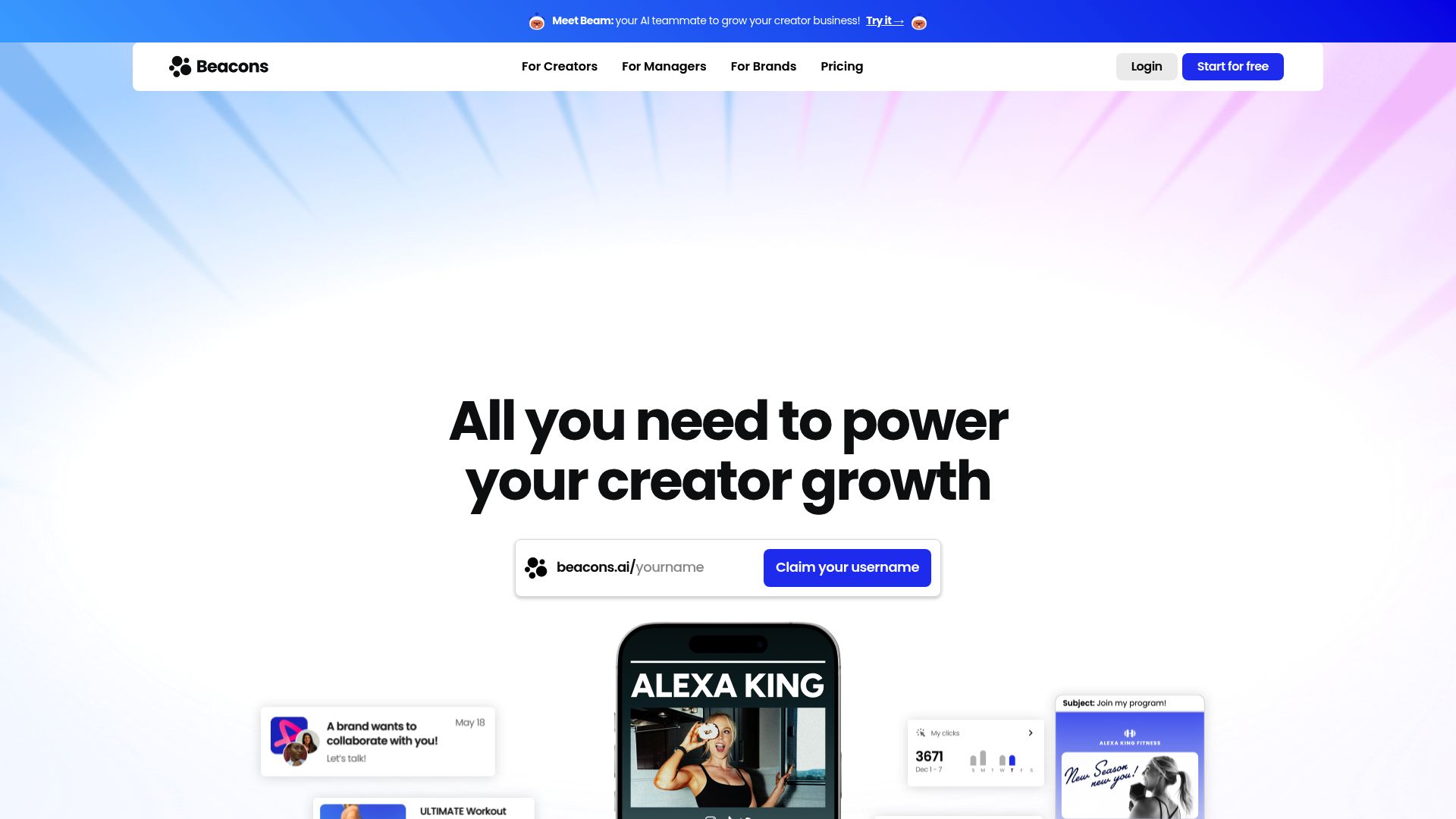
📸 beacons.ai
Source:
Data and Monetization Focus
Beacons really stands out because it packs a ton of power into its free tier.
One of its killer features is that you can embed content directly. Instead of just a text button that says "Watch my Video," you get to put the actual YouTube video right there on the page. A user can watch your latest music video or art tutorial without ever leaving your bio link.
Another massive advantage is the email collection block. Building a newsletter is one of the smartest things an artist can do.
Social media algorithms change, but you own your email list.
Beacons allows you to put a customized "Subscribe" block right at the top of your page.
The Complexity Factor
The downside to all these features is the learning curve. Beacons uses a block-based editor that can feel a bit overwhelming if you are not tech-savvy.
There are a lot of toggles, design options, and analytics dashboards.
For a painter who just wants to paint, or a musician who just wants to play, spending hours tweaking the padding on a button might feel like a waste of time.
It is a powerful tool, but it demands your attention to get it looking right. It can also start to look a little "busy" on a phone screen if you aren't careful about how you lay everything out.
Tool 3: Kiosque QR – The Artist-First Solution
Now for something that was built a little differently. Kiosque QR isn't trying to be just another link aggregator; it was designed from the ground up *specifically* for artists. So whether you do music, circus acts, street theater, stand-up, dance, or even magic, this platform is built to understand the unique vibe of a live performance.
When looking for an artist social media linking platform free option, you have to value context. Kiosque QR positions itself as the bridge between your physical performance and your digital presence.
It is less about "bio links" and more about "performance interaction."
📸 kiosque.com
Source: https://www.kiosqueqr.com
Simplicity Meets Utility
The promise here is speed. You can create your artist page in one minute with no technical skills required.
This matters when you are about to go on stage or set up your easel in the park. You don't want to fiddle with hex codes; you want a working page.
You can customize your page with your name, photo, and all your essential links (Instagram, TikTok, YouTube, etc.). It acts as your digital business card, but it is stripped of the bloat.
It is cleaner than a website and simpler than the complex creator tools.
The QR Code Advantage
Here is where Kiosque QR really shines as an easy artist networking platform. The app automatically generates a unique QR code for you to print. While other platforms give you a URL, Kiosque QR gives you the tool to be scanned.
Picture this scenario: You are a street performer. You have a crowd.
You don't have time to shout a URL. You simply display the QR code generated by the app.
Your audience scans it instantly. They discover your page, follow you, and connect.
The philosophy is simple: "You perform, they scan, you earn."
Monetization and Tipping
One of the hardest parts of being an artist is getting paid. Kiosque QR integrates this directly into the logic of the page.
In the Premium version, you can unlock a "Tips" button with an integrated PayPal link, but even the structure of the free profile directs people toward supporting you.
It bridges that awkward gap where people want to tip but don't carry cash.
By making the digital connection seamless, you open the door for digital support.
Comparing the Three Titans
To help you decide which artist social media linking platform free tier is right for you, let's look at them side-by-side.
It is not about which tool is "better" universally, but which is better for *you* right now.
| Feature | Linktree | Beacons | Kiosque QR |
|---|---|---|---|
| Best For | General use, bloggers, influencers | YouTubers, Streamers, Digital Creators | Physical Artists, Performers, Musicians |
| Setup Time | Fast (5-10 mins) | Medium (20-30 mins) | Instant (1 min) |
| Physical Focus | Low (URL focused) | Low (Digital content focused) | High (QR/Scan focused) |
| Customization | Basic colors/buttons | High (Full design control) | Streamlined (Photo, Bio, Links) |
| Learning Curve | Low | Medium/High | None |
Strategy: How to Build the Perfect Artist Page
Choosing the tool is only step one. An artist social media linking platform free account is an empty canvas. You need to paint it.
Regardless of which platform you choose, there are universal rules for making these pages effective.
1. The Bio is Your Elevator Pitch
You have very limited space.
Your bio needs to answer three questions immediately: Who are you?
What do you do?
Why should I care?
Avoid vague statements like "Just a dreamer." Be specific. "Oil painter capturing urban decay" or "Stand-up comedian based in Chicago."

Andrés Gómez / Unsplash
2. Prioritize Your Links
A common mistake is dumping every link you have ever owned onto the page. Do not link to a Twitter account you haven't used since 2018. Do not link to a Facebook page that is just reposts.
Focus on the platforms where you are active.
Use the "Prime Real Estate" rule.
The top three buttons get 80% of the clicks.
If you want people to listen to your new single, that link must be at the very top.
If you want them to buy tickets to a show, that goes next. Social media follows should be secondary to your primary artistic output.
3. Visual Consistency
Your link page should feel like an extension of your art. If your music is dark and moody, your link page shouldn't be bright pink. Use your artist profile photo—the same one you use on Instagram and Spotify—to create instant recognition.
When a user scans a QR code or clicks a link, they need to know instantly they have landed in the right place.
The Power of the QR Code in the Real World
We need to circle back to the physical aspect because this is where most artists leave money and connections on the table. We live in a hybrid world.
Your art often happens in 3D, but your growth happens in 2D (screens).
Using a tool like Kiosque QR allows you to hack this process.
Strategies include:
- The Stage Stand: If you are a musician, print your QR code large and tape it to your mic stand or synth rack. Mention it between songs.
- The Business Card Back: Don't put five URLs on your card. Put one QR code. It looks cleaner and creates curiosity.
- The Merch Table: Have a laminated sheet with your code on your merch table. Even if people don't buy a t-shirt, ask them to scan to follow your journey.
This is why Kiosque QR is often the superior create artist profile page free solution for those who leave their bedrooms to perform.
It understands that the scan is the start of the relationship.
Moving from Visibility to Community
Having a list of links is visibility. Having people click them and stay is community. The ultimate goal of using an artist social media linking platform free of charge is not just to organize links, but to funnel casual fans into "Super Fans."
The Funnel Concept
Think of your audience in layers.
Layer 1: The casual observer (saw you on street, saw a viral video).
Layer 2: The follower (followed you on Instagram).
Layer 3: The supporter (bought a ticket, tipped you, joined your Patreon).
Your link page is the sieve that moves people from Layer 1 to Layer 2 and 3. By making it frictionless to find your Instagram, you get the follow. By making it easy to find your PayPal or "Tips" button (a key feature of Kiosque QR's premium side, but relevant to the strategy), you enable the support.
If you use a complicated website that takes ten seconds to load on mobile, you lose the person at Layer 1. They scan, they wait, they get bored, they lock their phone.
Speed and simplicity are your best friends here.
Bhargav Panchal / Unsplash
Why "Free" is a Smart Starting Point
There is no shame in sticking to free tools.
In fact, it is financially responsible. As an artist, your margins can be thin.
Spending monthly fees on software before you are generating revenue is a trap. An artist social media linking platform free tier allows you to prove the concept.
Once you see that people are scanning your Kiosque QR code, or clicking your Linktree, you have data. You can see 50 people scanned it last night.
That validates the need to perhaps upgrade later for more advanced features like collecting emails or direct payment integrations.
But you do not need to pay to play initially.
Many artists think they need a full .com website immediately.
While owning your domain is good long-term advice, it often requires maintenance, hosting fees, and design skills. A profile page on Kiosque QR or Beacons takes the headache away. It is managed infrastructure.
You don't worry about servers crashing; you worry about playing the right chord.
Common Mistakes to Avoid
Even with the best easy artist networking platform, you can mess it up. Here are the traps to avoid:
Broken Links
This sounds obvious, but it is the number one killer of momentum.
A user clicks "Spotify," and gets a 404 error because you changed your artist name last week. Check your links once a month. Click them yourself.
Overwhelming Choice
Psychology tells us that when humans are presented with too many choices, they choose nothing. It is called Analysis Paralysis. If your link page has 15 buttons, the user will likely scroll up and down and then leave.
Stick to your top 5 most important destinations.
Ignoring the Call to Action
Do not just label a button "Newsletter." Label it "Join for Free Music." Do not just label a button "PayPal." Label it "Support the Art." Give people a reason to click. Verbs are powerful.
Use them in your button text.
Conclusion: Your Art Deserves to Be Found
The days of handing out sticky flyers that end up in the trash are fading. The digital world is the new sidewalk, the new gallery wall, and the new stage.
Creating a centralized hub for your work is one of the highest ROI activities you can do for your career.
Whether you choose the ubiquity of Linktree, the complexity of Beacons, or the artist-centric, scan-ready focus of Kiosque QR, the important step is that you take action.
Stop letting your potential fans slip through the cracks of the internet.
If you are a performer who thrives on live interaction, Kiosque QR offers a distinct advantage with its streamlined, scan-to-profile workflow. It cuts out the noise and gets straight to the point: connecting you with the people who enjoy your work.
Remember, your art creates the emotion, but your tools capture the audience.
Use an artist social media linking platform free today to ensure that the next time someone asks "Where can I find you?", you have the perfect answer ready.
Ready to level up?
Create your artist page in 1 minute with Kiosque QR and start turning your audience into a community.
FAQ
So, is Kiosque QR actually free?
Yes! You can create your account, set up your page, and generate your QR code without paying a thing.
There's a Premium version that lets you unlock direct tipping through PayPal, but all the core networking features don't cost a thing.
Can I see who scans my code?
Most platforms, including these, give you basic analytics on their free plans so you can get a headcount of how many people are visiting your profile.